 ·
Product Commercial
·
Product Commercial
You book a $10K shoot and wait 3 weeks. After this, two Fable prompts run it, and you get a 15 second cinematic for $8.
Eugenio on how we build creative systems for DTC brands.
Together they turn one product photo into a deploy ready 15 second ad.
What we are testing across 40+ brands, every Monday.
We rendered 40 product clips last month across 9 accounts.
The standard read is that AI video is not ready for brand work yet. It is a fair read. Most AI product clips do look wrong, and the tell lands inside 2 seconds.
The constraint is not the render model. Nothing upstream locks the product, so the model re-invents it on every beat.
AI video does not fail on realism. It fails on product drift.
The workflow has 3 named components. Each one hands a fixed artifact to the next.
→ The Storyboard Lock
One 6 panel image that fixes lighting, camera position and product geometry
before any video model runs.
→ The Handoff
Fable translates the approved storyboard into a Seedance prompt, so nothing
gets rewritten by hand between two tools that do not share a format.
→ The 9 Realism Anchors
Lens, shutter, depth of field, key direction, fill ratio, colour temperature,
surface reflectance, micro texture and grain. Nine specifics, named every time.
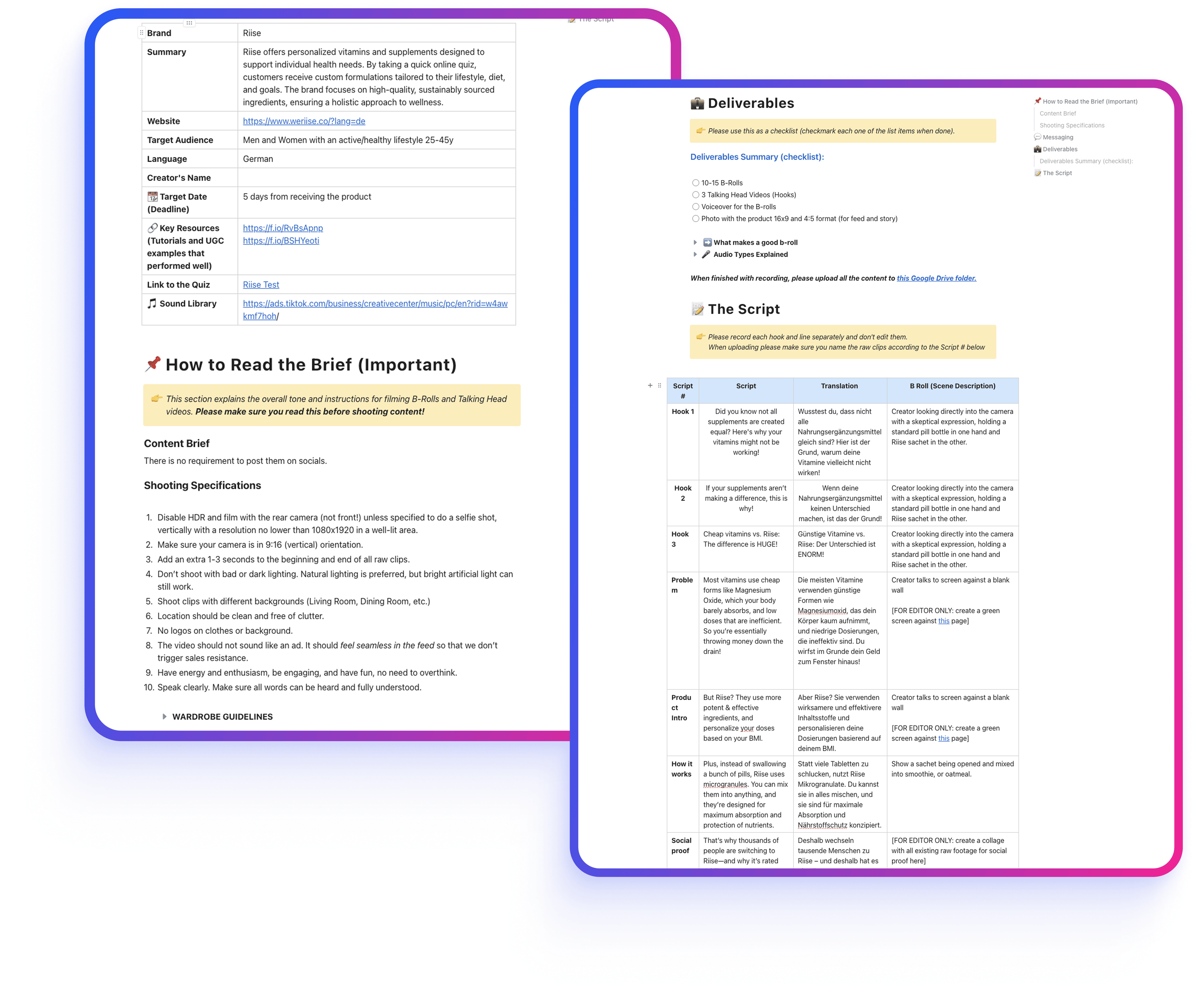
A production brief from the same system. The storyboard prompt does this job for product cinematics.
Eugenio built our entire creative strategy and direct response UGC videos, and scaled our paid performance from there.
Pick your vertical below and the tuned block appears. Paste it into both prompts, then run them in order. The first writes your storyboard. The second writes the render.
ROLE
You are a product commercial director writing an image generation prompt.

INPUT
Product photo: [ATTACH_YOUR_PRODUCT_PHOTO]
Brand: [BRAND_NAME]
Vertical block, pasted from the picker:
[PASTE_VERTICAL_BLOCK]

TASK
Read the product photo. Identify the material, the finish, the label
geometry and the single most photogenic angle.

Then write ONE prompt for GPT Image 2 that renders a 6 panel storyboard,
2 rows of 3, for a 15 second product cinematic.

The prompt you write must specify, for every panel:
1. Shot size and camera height
2. Lens in mm and depth of field
3. Key light position, quality and colour temperature
4. Product position, orientation, and what stays readable
5. Surface, backdrop, and one prop maximum
6. What moves in the panel that follows

CONSTRAINTS
The product stays identical across all 6 panels: same label, same
proportions, same finish.
Panel 1 is the wide establishing shot. Panel 6 is the hero beauty shot.
Do not include people, hands, text overlays, or any logo other than the
product's own.

OUTPUT FORMAT
Return the finished GPT Image 2 prompt as one paste ready block.
Below it, return a 6 row table: Panel, Shot, Lens, Light, Movement.
Do not explain your reasoning.
Run the output in GPT Image 2. Approve the storyboard before you go near prompt 02. Panel 6 is the one to be picky about.
ROLE
You are a video prompt engineer translating an approved storyboard into a
Seedance 2.5 render prompt.

INPUT
Approved storyboard: [ATTACH_YOUR_STORYBOARD_IMAGE]
Product: [PRODUCT_NAME_AND_MATERIAL]
Vertical block, the same one you used in prompt 01:
[PASTE_VERTICAL_BLOCK]

TASK
Write ONE Seedance 2.5 prompt for a 15 second cinematic that follows the
storyboard panel order. Build it in 4 blocks, in this order.

1. SHOT LIST
   Six beats, each with a duration in seconds. Durations total 15.
   Per beat: camera move, subject, and what changes.

2. PRODUCT LOCK
   Describe the product once in physical terms: material, finish, label
   position, proportions. State that none of it changes between beats.

3. THE 9 REALISM ANCHORS
   Name all nine: lens and focal length, shutter feel, depth of field,
   key light direction, fill ratio, colour temperature in kelvin, surface
   reflectance, micro texture, grain.

4. NEGATIVE PROMPT
   Morphing labels, warped geometry, floating product, duplicated objects,
   text artefacts, hands, faces, watermarks, plus every item listed under
   "do not render" in the vertical block.

CONSTRAINTS
One camera move per beat, never two, and keep every move slow.
Do not invent product features that are not visible in the storyboard.

OUTPUT FORMAT
Return the 4 blocks as plain text, ready to paste into Seedance.
No preamble.
Render at 15 seconds, then cut in CapCut. If a label drifts, the fix is in block 2 and block 4, not in a re-roll.
Symptom: every beat renders a slightly different product. Cause: the video model had no fixed reference to hold to. Fix: approve the 6 panel image before you write a single line of the render prompt.
Symptom: the product warps halfway through the move. Cause: a dolly and an orbit in the same beat hand the model two conflicting geometries. Fix: one move per beat, and keep it slow.
Symptom: label text turns to noise on the hero shot. Cause: nothing told the model the label is fixed copy rather than decoration. Fix: name the label in the product lock and again in the negative block.
This works when the product is the hero and the product is the story. Skincare bottles, supplement tubs, apparel on a surface, hardware on a bench. Run it once end to end before you judge the output. The first pass usually lands close and wrong, and the cause is almost always a storyboard that got approved in 20 seconds. Slow down on panel 6. That is the frame the ad actually sells on.
It will not replace a shoot where a person uses the product on camera. Hands at close range and faces still break, and no negative block fixes that yet. If the ad needs a human demonstrating the thing, book the shoot.
A $10K shoot buys you one look. A system buys you every look after it. System > Spend.
The next resource in the library, the week it ships.